Play Minesweeper Online
Uncover the Numbers, Flag the Mines and Beat Your Best Time – Free and Full Screen!


The classic game of hidden mines and helpful numbers, free in your browser. No download, no sign-up and nothing to install, so you can play Minesweeper unblocked at school, at work or anywhere else you're online. It works just as well on your phone as on a big screen. Choose Easy, Medium or Hard, click a square and let the numbers guide you to the last safe spot.
Minesweeper the Way You Remember It
If you grew up with a Windows PC, or got hooked on Google Minesweeper during a search break, you already know this one: a grid of covered squares, a handful of mines hiding underneath and a countdown of flags in the corner. Our version keeps everything that made the original great – the three board sizes, the timer and the flags – and adds the comforts you expect today. Your first click is always safe, almost every board can be solved without guessing and your best times are saved for each level so you can watch yourself improve.
Quick Start
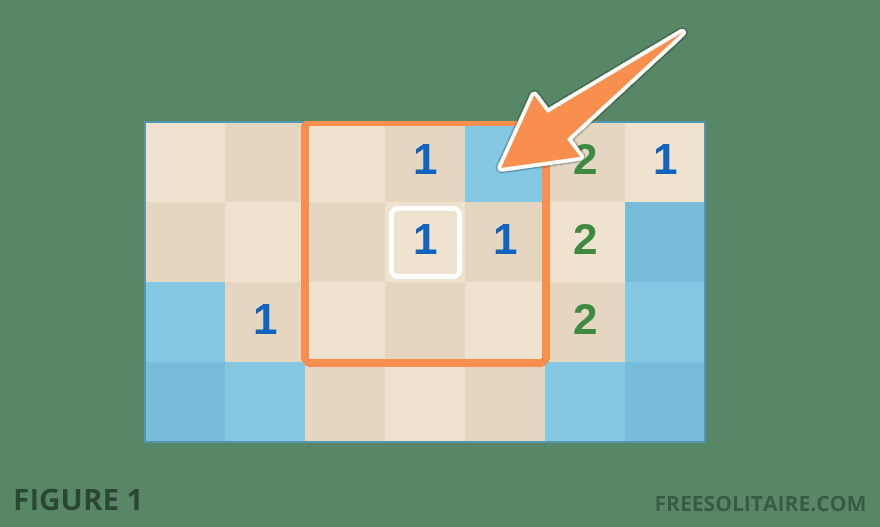
Left-click a square to uncover it. The number that appears tells you how many mines are hiding in the eight squares around it. Take the highlighted 1 in the picture above: it touches a single covered square, so there's nothing left to work out. That's your mine. Right-click (or press and hold on a phone) to plant a flag on it. Uncover every safe square and you win; click on a mine and it's back to the start. Prefer tapping? The shovel and flag buttons in the top right corner let you switch between digging and flagging without a right mouse button. New to the game or a bit rusty? Our Minesweeper rules explain every step with pictures.
Three Levels, One Rule
- Easy: a small board with 10 mines, perfect for learning what the numbers mean.
- Medium: a bigger field with 40 mines on desktop, the level most players settle on.
- Hard: 99 mines on desktop and a lot of thinking. Clearing this one earns bragging rights.
Whatever the size, the rule never changes: read the numbers, mark the mines and never click a square you can't explain.
Four Quick Tips
- Start with the sure things: a number with just one covered square beside it has given its mine away, like the 1 in the picture above. Clear those first and the next clue usually turns up by itself.
- Learn one pattern: spot a 1-2-1 in a row against a line of covered squares? The mines sit next to the 1s and the square by the 2 is safe. Every single time.
- Only flag what you can prove: one wrong flag throws off every number near it. Not sure? Leave the square bare.
- Stuck? Move on: a square that looks like a gamble rarely is one. Solve somewhere else and come back with fresh numbers.
Each of these is explained step by step in our Minesweeper tips and strategies.
Made for Desktop and Mobile
On a computer you get the full-size boards, right-click flagging and chording (middle-click a number whose mines are all flagged to open the rest of its neighbors). On a phone or tablet the grid resizes to fit your screen, flags go down with a long press and the flag switch is always within thumb's reach. Sound effects can be turned off in the settings, and you can pick a different background if the green isn't your color.
Track Your Progress
Open the menu and tap Statistics to see how many games you've played and won, your win percentage and your best and average times on each level. Everything is stored in your browser, so your records are waiting for you next time, no account required.
More About Minesweeper
Curious how a side project by two Microsoft programmers ended up on hundreds of millions of computers? Read the history of Minesweeper. Stuck on a question about flags, guessing or statistics? Our Minesweeper FAQ has the answers. And when you need a break from the mines, try a round of Freecell, Pyramid or Yahtzee, or pick any of our other free games.